

Mini-App · Templates
Order tracker template: every sales channel on one page
For online shops selling on several channels who want their orders in one place: what they took, what is still unpaid and which channel sells best.
One line an order: day, number, customer, channel, item, amount and state. The page adds up takings without cancellations, picks out unpaid orders and compares the channels.
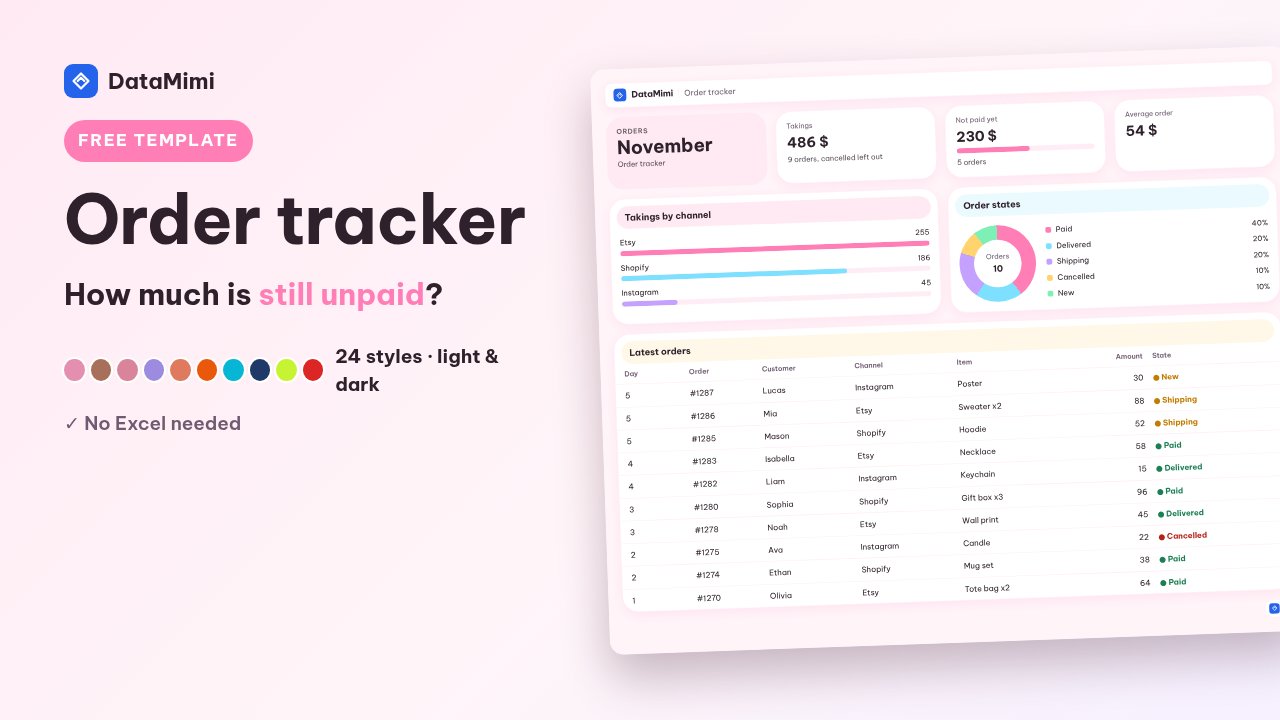
Try 24 styles:
DataMimi
OrdersNovemberExample figures
Takings486 $9 orders, cancelled left out
Not paid yet230 $5 orders
Average order54 $
Want it to work exactly your way?
Keep this tool in your Mini-Apps to run it again in one click, or describe the job and AI builds an app of your own.
How to use it
- 1Press “Add to my Mini-Apps”, then “Enter figures”.
- 2Type a line at a time; the page does the sums and draws the charts as you go.
- 3Pick one of 24 styles, light or dark, and print to PDF when you need it.
Common questions
Does this template cost anything?
No. Typing, viewing, changing the style and printing are free and use no credits.
Where is my data kept?
In your DataMimi account, a month at a time. Nobody else sees it unless you share the board.
Can I print it or send it to someone?
Yes. Press Print / PDF, or share the link so others can see your board.
More templates Mini-Apps
Monthly budget template: income, spending, bills and savings on one pageA household budget template you use on the web: type income, spending, bills and savings and the page works out what is left to spend. 24 styles, no Excel.Sign-in sheet template: visitors, staff and deliveries in and outA sign-in sheet for offices, workshops and shops: log visitors in and out and see at once who is still inside. 24 styles, print to PDF, no Excel.Timesheet template: hours, late arrivals, overtime and payA shift timesheet for cafés, shops and small teams: works out hours, late arrivals, overtime and pay for each person. 24 styles, PDF, no Excel.Project plan template: a Gantt chart with owners and late tasksA Gantt project plan for small teams: who does what, when it starts and ends, and which tasks are late. 24 styles, print to PDF, no Excel.